 14 July 2026
MacBook vs Surface Pro
Compare MacBook and Surface Pro performance, displays and flexibility to find the right refurbished device for the way you work.
Read Guide →

Date Posted: 4 June 2026
Wouldn't it be nice if you could claim your laptop on taxes? Well, you can! But don't celebrate just yet. First, you need to meet the specific criteria to claim. The ATO (Australian Taxation Office) is pretty clear on this: you can't just claim for expenses because you're studying; there needs to be some that are directly linked to income in some way or another.
So, here's the deal. If you're studying and working at the same time, and the course you're taking benefits your current employment, then you can claim self-education expenses. Let's elaborate on that a bit.

So, what income does your laptop have to be linked to? Can your parents send you money? Does that classify as income? Not exactly. The income we're referring to here needs to be wages from your current employment, part-time job and any taxable payments you've made.
Now, when you link your income to your education, your laptop can be treated as a self-education expense. Self-education expenses are all the costs linked to your course, which include things like tuition fees, car expenses, travel fees, student and amenities fees...and yes, you guessed it, equipment like laptops if you can show that it's necessary for your degree.
This is what we mean by "related to your work". The course you study needs to either help you maintain or improve your skills for your current role, or result in your earning a higher income. So, if you're a business manager, studying a Master's in Business Administration could do both. It'll improve your skills for your position and open up the door for greater income potential.
To qualify for self-education deductions, you would need to meet at least one of these four criteria:
The course needs to improve your skills or specific knowledge
It maintains your formal qualification or adds to it
It forms part of your training
It leads to higher income in your current employment (not a higher-paying position elsewhere)
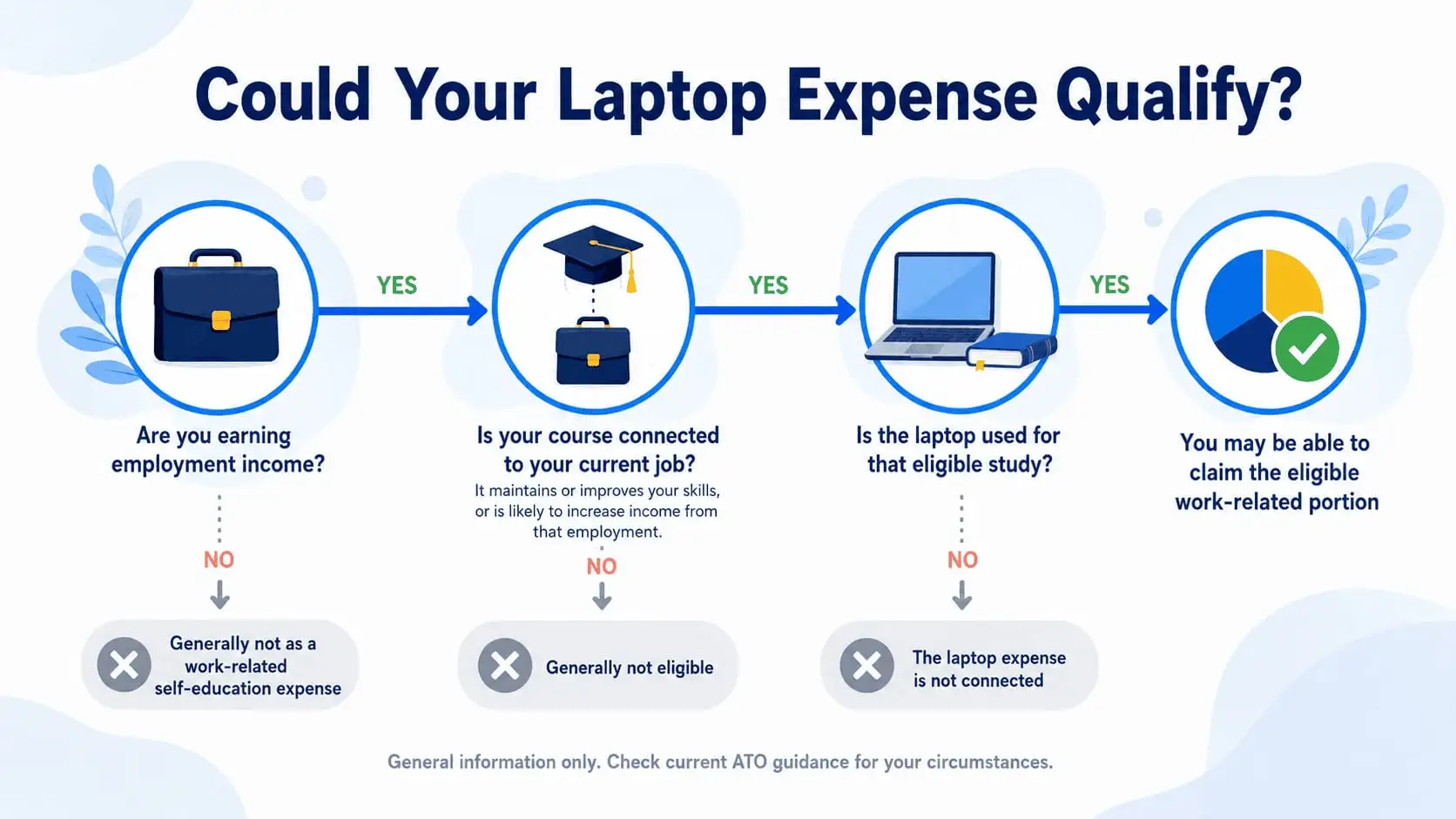
Yes, you can for a laptop on your taxes. It can be claimed as self-education expenses. But to claim a deduction for your laptop, you need to prove that it's linked to your work and studies (and not just being used for private purposes). Here's a breakdown of how this looks:
Here's something many students don't realise. You almost certainly cannot claim 100% of the value of your laptop. Why? Because most of us use our laptops for everything:
Uni assignments
Netflix
Online shopping
Catching up on emails
The ATO is fully aware of this, and they expect you to only claim the portion that's genuinely study-related. If you use your laptop 70% of the time for your course and 30% for personal use, you can only claim 70% of the expense as tax-deductible. So be honest with yourself and work out a reasonable split. You don't need a fancy tracking system. A simple log or even a quick estimate based on your weekly habits is fine, as long as it's consistent and reasonable.
The other thing to know is whether you can claim the full cost upfront or need to depreciate it. For assets like a laptop costing over $300, you claim the decline in value (i.e., depreciation), and you must also apportion the cost between work, study, and private use. So if your laptop costs $1,500 and you use it 70% for study, you're depreciating 70% of $1,500 over its useful life, not claiming the whole thing in one hit. If your laptop costs $300 or under and is mainly used for study, you can claim the full cost in the same income year. Good news if you grabbed a budget option.
.webp)
The laptop itself is just the beginning. There's actually a solid list of related items you can claim alongside it, and these are the ones people often forget about entirely. Computer consumables like printer ink, USB drives, and stationery also count, along with student union fees, student services and amenities fees, and internet usage, though you'll need to exclude connection fees. Think about the software you use for assignments, too. Programs, subscriptions, and apps are all claimable. Here's a quick summary of what's on the table:
Computer software and app subscriptions
Printer ink, USB drives and stationery
Student union and amenities fees
Internet usage (excluding connection fees)
Desk lamps, office chairs and filing cabinets are used for study
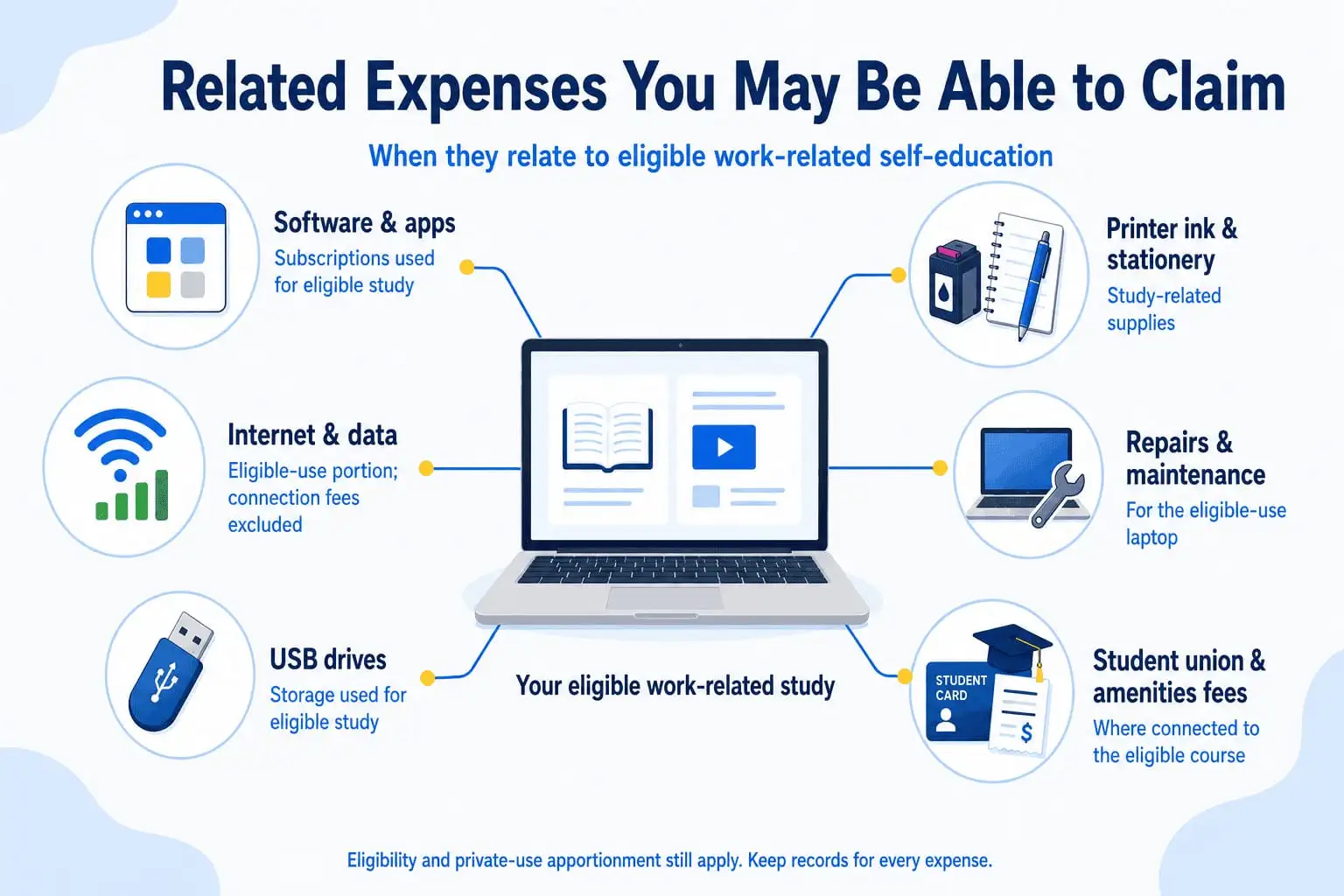
Things break. It's just life. If your laptop needs a repair, a replacement part, or general maintenance, those costs are also claimable as long as the laptop is being used for work related self education. So keep any invoices or receipts from repair shops. It's one of those expenses that's easy to overlook but absolutely legitimate.
A laptop without internet is basically an expensive paperweight, so the good news is you can claim your internet costs, too. The catch is the same as with the laptop itself. You can only claim the study-related portion. Internet usage is deductible, but connection fees must be excluded. So, if you estimate that 60% of your home internet use goes towards your course, you claim 60% of the bill. Simple enough.
This one surprises a lot of people. You can claim travel costs between your workplace and your place of education, but only certain trips qualify. Here's what you can include:
Train and bus fares
Parking fees
Car expenses when travelling between home, work and study
Just make sure you're tracking these trips and keeping records, because the ATO will want to see proof if they come asking.
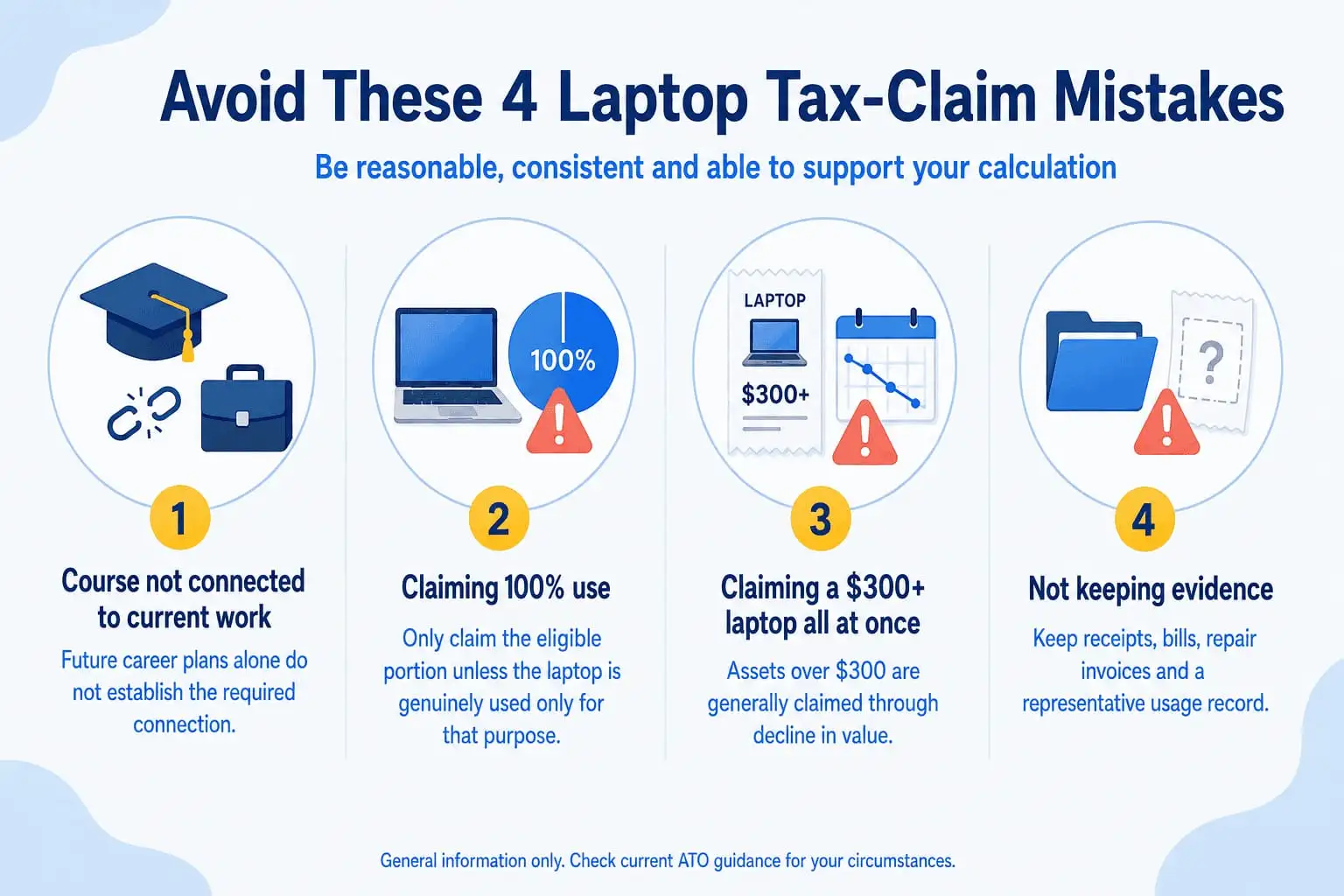
This might all seem pretty straightforward if you tick the right boxes, but people still kick their toe on a few common areas while trying to claim. These are some of the mistakes that you should try to avoid when placing your claim:
This is the big one, and it catches a lot of students out. If you're studying something that isn't directly connected to your current job, you simply cannot claim it. It doesn't matter how relevant the degree might feel to your future career. The ATO is only interested in what you're doing right now.
So if you're working as a graphic designer and studying an advanced design course, you're in good shape. But if you're working in hospitality and studying accounting to eventually switch industries, that connection isn't there. The course has to benefit your current role, not a future one you're hoping to land. If you're unsure whether your situation qualifies, it's worth having a chat with a registered tax agent before you lodge your return.
Unless your laptop is literally only ever used for study and nothing else, you cannot claim the full cost. Most of us use our laptops for a whole mix of things throughout the day, including assignments, streaming, social media, personal emails, and online shopping. The ATO knows this, and claiming 100% use when that clearly isn't the case is one of the fastest ways to attract unwanted attention.
Work out a genuine estimate of how much time you spend using your laptop for study versus everything else. If it's around 65% study-related, claim 65%. Keep a simple log or use your device's screen time tools to help you work this out. The key is being reasonable, honest, and consistent.
Many students see their laptop as a one-off purchase and try to claim the full cost in a single tax return. But for any item costing over $300, the ATO requires you to spread that deduction over the useful life of the asset. This is called depreciation, or a decline in value, and it applies to laptops because they lose value over time.
So instead of claiming $1,200 all at once, you'd claim a portion of that each year, adjusted for your study use percentage. It takes a little more calculation, but it's not complicated once you understand the concept. Skipping this step and claiming the full amount upfront is a mistake that could lead to your claim being adjusted or reviewed.
This one is simple but incredibly important. If you can't prove it, you can't claim it. The ATO can request evidence of any deduction you've made, and without proper records, your claim can be reduced or removed entirely.
What you need to hold onto includes:
Receipts and invoices for your laptop and any accessories
Internet and phone bills showing usage costs
A usage log or estimate showing your study versus personal split
Any repair or maintenance invoices
Buying a laptop is a real investment, one that you want to do right the first time around. Like with other assets, some laptops keep their value better than others. Factoring this in among other factors will help you choose a laptop that not only suits your course better, but also helps you at work and ensures a better tax deduction for you in the end. Here are some tips on how to choose the right laptop for Uni:
There are a few things every uni student should consider before pulling out their card:
Battery life: This is probably the most important factor for students on the go. Aim for at least 8 hours of real-world battery life so you can get through a full day of lectures, study sessions, and work without needing to find a power outlet.
Portability: You're going to be carrying this thing everywhere, so weight matters. Something in the 1.2kg to 1.6kg range is a good target if you want something that won't wreck your shoulders on a long day.
Processing power: For most students, a mid-range processor like an Intel i5, AMD Ryzen 5, or Apple M2 chip is more than enough. You don't need to spend big on the latest and greatest unless your course genuinely demands it.
Storage: A 256GB SSD is a minimum, but 512GB gives you much more breathing room for software, files, and everything else that accumulates over time.
RAM: 8GB is the baseline for smooth everyday use, but 16GB is worth the upgrade if your budget allows, especially if you're running multiple programs at once.
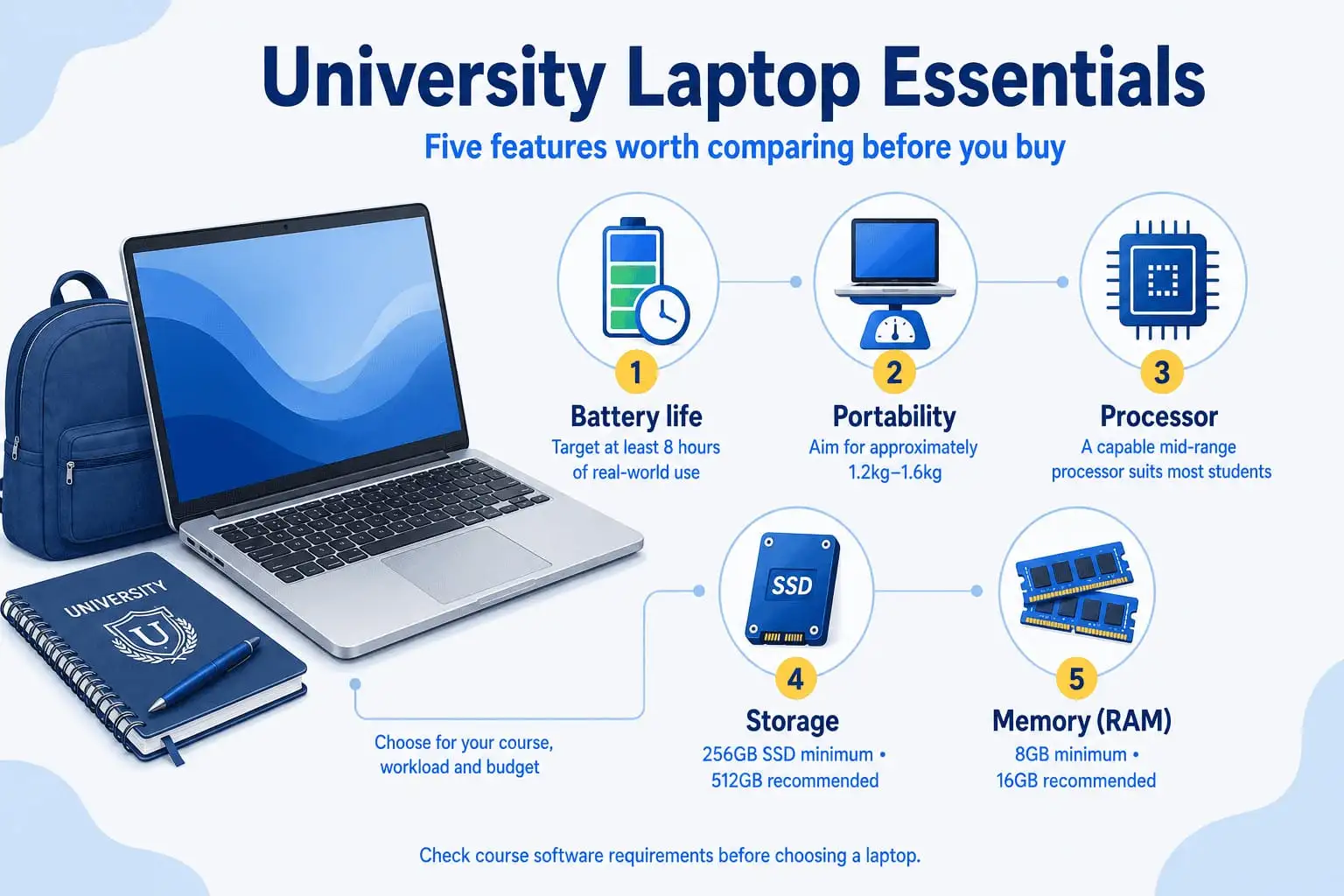
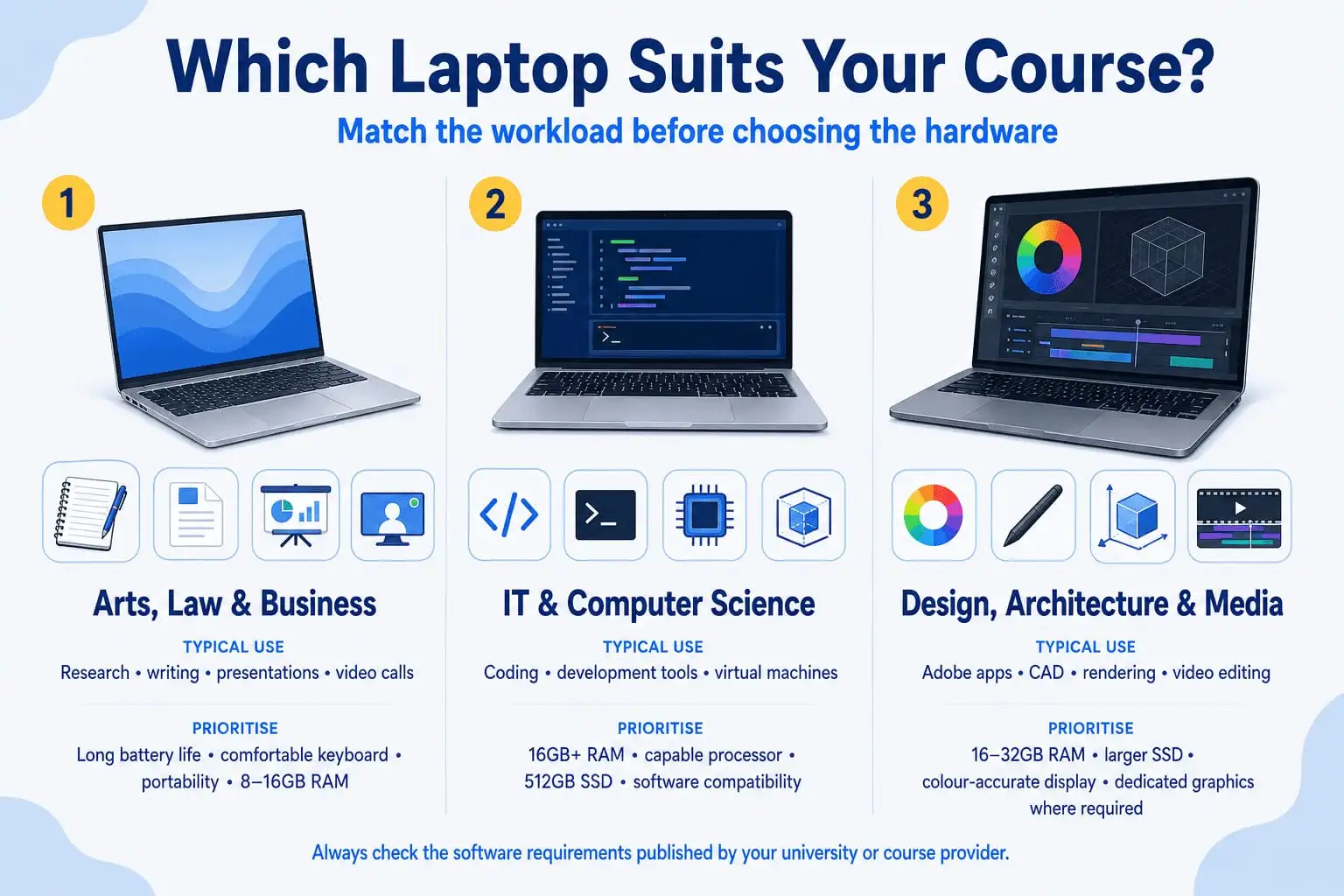
Not every student needs the same setup, and buying more than you need is just as much of a mistake as buying too little. Here's a rough guide to help you match the machine to the degree:
Arts, law and business students can comfortably get by with a reliable mid-range laptop. A good keyboard, solid battery, and a clear display are really all you need for research, writing, and video calls.
IT, software engineering and computer science students will benefit from more processing power and RAM. You'll be running code, virtual machines, and development environments, so don't skimp on performance.
Design, architecture and media students need a laptop with a strong graphics card and a high-quality, colour-accurate display. Programs like Adobe Creative Suite, AutoCAD, and video editing software are demanding, and a budget machine simply won't keep up.
To summarise what we've discussed, claiming your laptop on your taxes boils down to three things: a genuine connection to your current employment, detailed record keeping, and understanding how depreciating assets work. Get those right, and you'll find that claiming for your laptop is a breeze, and as a bonus, your laptop will have paid itself off in more ways than one.
14 July 2026
 2 July 2026
 29 June 2026
 4 June 2026
 30 March 2026
 19 February 2026
 2 February 2026
 6 January 2026
 29 December 2025

Thoroughly tested by qualified technicians

Most orders delivered within 3-7 business days

Our local team are here to help you

Industry leading warranty on all products
We're here to help! Click here to contact Customer Service


 Help Centre
 Contact Us