 14 July 2026
MacBook vs Surface Pro
Compare MacBook and Surface Pro performance, displays and flexibility to find the right refurbished device for the way you work.
Read Guide →

Date Posted: 19 February 2026
Understanding the difference between integrated and dedicated graphics cards and deciding which one is right for you can seem impossible, especially if you have never needed to consider this before. Figuring out which option is best for you, which will suit your budget, and which will help you choose a powerful laptop can quickly leave you feeling overwhelmed and confused, unsure where to turn or who to trust.
Luckily for you, we are here to help! Today, we break down the differences between integrated and dedicated GPUs and the factors you need to consider to make the right choice for your needs.
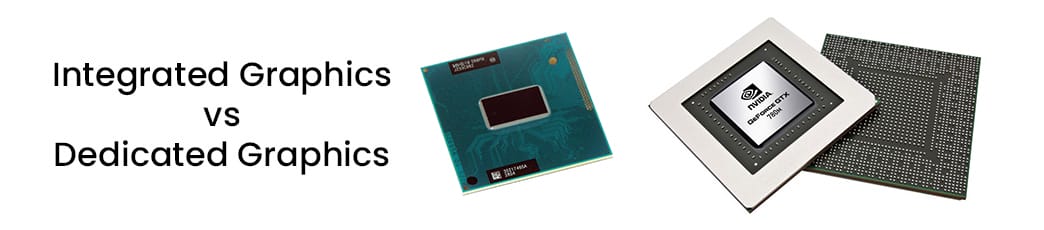
Before we dive into our article, you must understand how GPUs work and your options. A GPU, or graphics processing unit, is responsible for visual effects on your screen and for rendering images, videos, and animations. These graphics cards will either be separate entities, known as dedicated GPUs, or sit within your laptop's CPU. You must understand how they work and how they differ from your CPU, so you know what to look for when purchasing your laptop. The main differences and responsibilities are listed below:
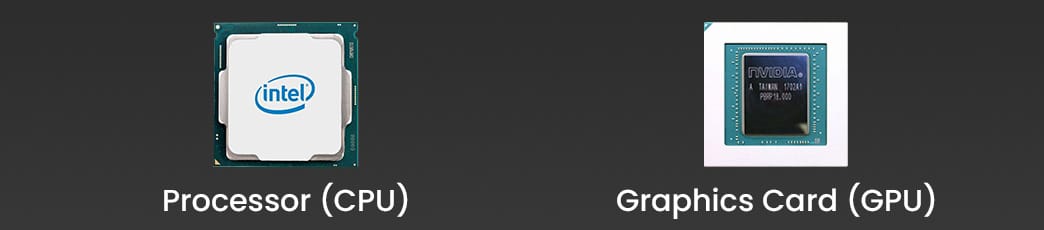
GPU: handles video playback, graphics rendering, and parallel workloads
CPU: handles calculations, logic, and general system tasks
Modern software usually offloads tasks such as AI acceleration, video encoding, and 3D rendering to the GPU, improving the speed and efficiency of your laptop.
You also need to understand what your laptop GPU will render and be responsible for, including:
Display output to one or more screens
Gaming graphics and physics
GPU-accelerated workloads in engineering and creative software
Photo, video, and 3D rendering
Video playback and streaming
Integrated and dedicated graphics cards use memory differently, which plays a huge role in how your laptop functions. Integrated GPUs share system RAM with the CPU, so when intensive graphics tasks are running, your laptop will run more slowly. Deducated GPUs, however, have their own VRAM (video memory), which allows you to run intensive tasks, like gaming or 3D rendering, without your laptop slowing down.
Integrated graphics cards are designed to sit in the CPU and are common in everyday laptops, especially in more affordable options. Integrated graphics cards are a good choice for many, but you need to understand their benefits and drawbacks to make an informed decision:
Integrated graphics cards have several benefits, including:
Excellent power efficiency
Enables thinner and lighter laptop designs for enhanced portability
Lower heat output reduces the risk of overheating during intensive tasks
Lower cost, making them better suited for tighter budgets
Quieter operation for smoother working in public
When looking for integrated graphics cards, we recommend modern versions, such as AMD Radeon or Intel Iris Xe graphics, as they are more powerful than older generations and can handle everyday tasks with minimal effort.
Despite their benefits, there are a few drawbacks of integrated GPUs that you need to consider before making your purchase, including:
Limited performance with modern games, especially those with 4K graphics
Shares memory with the CPU, reducing available RAM and impacting performance
Slower when handling heavy creative workloads, video exports, and 3D rendering, and you might notice lag or buffering when completing these tasks
Integrated graphics cards are useful, but they are not the best option for heavy creative workloads. Instead, you would need a dedicated graphics card with its own VRAM to handle these intensive tasks. Integrated GPUs should be saved for general productivity, light creative work, and media consumption.
Dedicated graphics cards, or discrete GPUs, are different from integrated GPUs and sit separately inside your computer. A discrete GPU is a separate hardware component that will sit alongside the CPU. A dedicated GPU will come with its own processing cores, dedicated VRAM (video memory), and independent power and cooling requirements, allowing it to work independently. Without drawing power from your CPU, your dedicated GPU can run heavy creative tasks, high-resolution games, or simulation software without impacting your laptop's overall performance. Doing so makes it easier for you to multitask without noticing any buffering or lag. When looking for dedicated GPUs, AMD Radeon RX and NVIDIA GeForce RTX are popular choices for laptops.
An integrated graphics card offers several benefits, including its separate power and VRAM. Popular benefits that laptop users experience include:
A higher rendering performance
Better support for creative software and modern games
Dedicated memory to improve stability and speed
Hardware acceleration for video encoding, ray tracing, and AI
Despite the benefits, there are a few drawbacks and limitations that you should consider when making your choice, including:
A higher power consumption, especially when running intense tasks
Heavier and thicker laptop designs are required to allow for the added component
Increased heat output, which needs to be matched with additional cooling systems
Increased cost, making them unsuitable for users with a tighter budget
Shorter battery life, especially when running large files, games, or programs
These drawbacks can be addressed by ensuring your laptop has adequate cooling and by choosing a battery with the right capacity to suit your needs. Typically, as they cost more, we recommend laptops with dedicated graphics cards for anyone prioritising performance or using visually demanding software.
To help you compare and choose the right graphics card for your needs, we have included the vital features you should consider in our handy table below:
|
Feature |
Integrated Graphics |
Dedicated Graphics |
|---|---|---|
|
Performance |
Low to moderate |
High to very high |
|
Memory |
Shared system RAM |
Dedicated VRAM |
|
Battery Life |
Excellent |
Reduced |
|
Heat & Noise |
Minimal |
Higher |
|
Laptop Size |
Thin & light |
Thicker & heavier |
|
Cost |
Lower |
Higher |
|
Upgradeability |
Not upgradeable |
Not upgradeable |
It's important to consider the real-world benchmarks for both types of graphics cards to help you determine which is best for you. In gaming, benchmarks typically measure frames per second (FPS) at 1080p resolution and compare performance at medium and high settings. Integrated graphics will usually perform well with older or less demanding games, while dedicated graphics cards will offer smoother gameplay and higher quality graphics.
When carrying out creative work, we use video export times in Adobe Premiere Pro or DaVinci Resolve as benchmarks. Dedicated GPUs offer faster export and rendering times by accelerating encoding and effect tasks. 3D rendering benchmarks in Blender show where the performance gap lies: complex scenes take integrated graphics cards several minutes to render, while dedicated graphics cards take far less time. Consider how these benchmarks apply to your intended use of the laptop to determine whether an integrated or dedicated graphics card is right for you.
It's essential to consider the cost of your laptop, as the GPU contributes to the price. Laptops with dedicated GPUs will typically cost more due to the graphics chip and the additional power delivery, thermal management, and cooling needed to support it. Laptops with dedicated GPUs often have more powerful CPUs, which can increase the cost. Alongside the internal components, you will usually find a more durable chassis, though it may be heavier and bulkier than the laptop's chassis with an integrated graphics card.
Laptops with integrated graphics cards are usually more affordable and feature lower-spec components, making them better suited for everyday tasks, studying, and office work. You can usually find super-light and portable laptops with integrated graphics cards, too, making them ideal for commuting or working on the go.
When choosing a laptop, battery life is an important feature to consider, as it determines how long you can use the laptop on the go. Whether you travel frequently, commute, or use the laptop for studying, you will want to ensure it has a suitable battery life for your needs. The internal components can affect your laptop's battery life, including the graphics processing unit. Discrete graphics cards can shorten your laptop's battery life because they require more power than integrated graphics. Since a dedicated GPU is a separate entity, it requires more power to run, shortening your battery life. Typically, users with dedicated graphics cards run more intensive programs, which also drains the battery. In comparison, you can find laptops with integrated graphics that offer longer battery life, allowing you to use them for longer on the go.
On average, you can expect the following battery lives:
Dedicated GPU laptops: 4 - 8 hours, depending on the load
Integrated GPU laptops: 8 - 14 hours, depending on the usage and other internal components
No matter the battery life, you will likely want to extend it at some point, especially if you are using the laptop on the go. To ensure that you get the most out of your laptop's battery, we recommend the following tips:
Regularly update your drivers to ensure better efficiency
Disable your discrete GPU when you aren't using it to free up more power and save battery life
Lower your screen brightness and refresh rate when you don't need a bright screen and fast visuals
Use power-saving or balanced profiles
Modern laptops often come with hybrid or switchable graphics. These laptops will feature both integrated and dedicated GPUs, with the option to switch between them as needed, making the laptop more efficient. Typically, the laptop uses its integrated graphics card for everyday tasks before switching to a dedicated GPU for demanding workflows, such as video editing and gaming. The operating system and GPU drivers handle the switch, so users can access higher performance when needed without manually adjusting their graphics settings. Nothing will slow you down when you are in the flow.
Some performance-focused laptops will feature a MUX (multiplexer) switch. This connects the display directly to the discrete graphics card, reducing latency and improving frame rates, which is beneficial for any video editing or 4K gaming. Some users will benefit from manually forcing the dedicated GPU, as it can provide a more consistent performance for GPU-accelerated software, 3D modelling, gaming, or video editing. When these do not automatically trigger the switch, manually switching will ensure you get the performance you need. Dropping so can increase the laptop's power usage and heat, so you will want your charger nearby and to ensure the vents are dust-free!
You should choose a dedicated graphics card if you are using the laptop for gaming or content creation. The added power of discrete graphics cards lets you run high-resolution graphics or intensive programs without lag or poor performance. Typically, we recommend dedicated GPUs for:
Professional or 4K gaming
Photo and video editing
3D artists
Developers using GPU-accelerated tools
Dedicated GPUs aren't necessary for everyone, and many laptop users can save on their new laptop by choosing one with an integrated GPU. We recommend integrated GPUs for the following:
Students or office workers
Casual users looking to stream and browse
Anyone prioritising battery life and portability

When choosing your new laptop, we have some tips to help you pick the right one, ensuring its GPU is a good fit. Use the following to narrow your search and find your new laptop today:
Check third-party benchmarks to ensure the laptop and GPU will meet your needs
Check the GPU TDP and cooling design to ensure it can handle any additional heat from your workload
Check driver and OS support
Check for an MUX switch if you are using the laptop for gaming
Check VRAM, prioritising it for high-resolution workloads
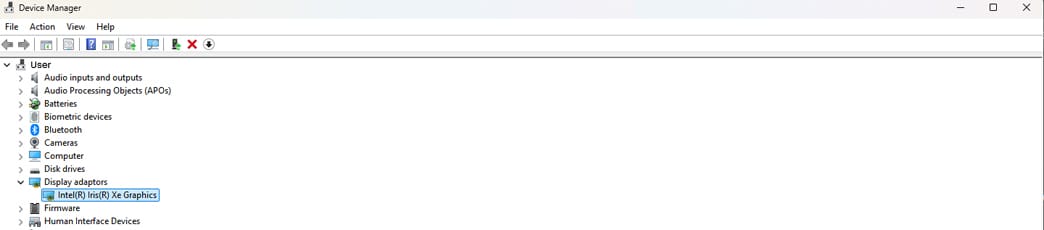
Before purchasing your new laptop, check the graphics card in your current one. Doing so ensures you are upgrading with your new purchase. Checking the graphics card usually involves opening Device Manager on your laptop and going to Display Adapters. Here you will see the type of graphics card that you have, and any VRAM (if it is a dedicated GPU). You can also use your System Information to view this information if needed.
For those who want to see the detailed specifications of their GPU to ensure that they are choosing an appropriate upgrade, they can use tools like GPU-Z. These detailed specs are worth considering, especially if you plan to use the laptop and GPU for high-resolution gaming or editing.
You will need to maintain your GPU regularly and ensure it has proper driver support to keep your laptop running smoothly. What this includes varies slightly depending on your laptop, but it typically includes regularly updating your GPU drivers. You can do this on the manufacturer's website, such as Intel, AMD, or NVIDIA, which will provide bug fixes, performance improvements, and compatibility updates for new games and software.
Should you experience any instability or performance issues, you can run stress tests to determine whether the GPU is operating correctly or if there are any issues to address. Physical maintenance should also be carried out regularly, ensuring vents are free of dust to prevent overheating that could affect the performance of your GPU and other internal components.
Understanding the difference between an integrated and dedicated GPU will help you narrow your choice and find the perfect laptop. If you are looking for a laptop to use for everyday tasks and light gaming, an integrated graphics card is perfect, and you can find affordable options to suit every budget. If you plan to run intensive media tasks, such as 4K gaming or video editing, a dedicated graphics card is the better option. While laptops with discrete graphics cards can be more expensive, you can find reasonably priced options here at Australian Computer Traders. All of our refurbished laptops come with extended warranties, and you can filter by graphics card type to make it even easier to find your new laptop. Which one will you choose today?
The biggest difference between integrated and dedicated graphics cards is that integrated graphics are built into the CPU and share system memory with the CPU. In contrast, dedicated graphics cards have dedicated memory that provides additional power and performance for high-end gaming, video editing, and 3D rendering. The dedicated graphics card will sit as a separate entity on your motherboard and will require additional thermal components to prevent overheating.
For most users, integrated graphics cards will be good enough for casual gaming and everyday use. Integrated graphics processing units provide enough power for casual gaming, older games, and HD games, as well as everyday tasks like streaming or viewing photos and videos.
Dedicated graphics cards can shorten your laptop's battery life compared to laptops with integrated graphics. Dedicated GPUs require separate power, which can drain your laptop's battery. When using the GPU to run media-intensive tasks, such as 4K gaming and photo and video editing, you will notice your laptop battery does not last as long, and you may want to consider battery-saving measures, such as power-saving modes.
The amount of VRAM you need on a dedicated graphics card varies, but 8 GB is usually the minimum recommended. This will allow you to play modern games with 1080p/1440p resolutions without any lag or performance issues. If you are looking to future-proof your laptop or play mostly 4K games, you should look for 12 to 16 GB VRAM for your discrete graphics card.
Usually, you will not be able to upgrade from an integrated graphics card to a dedicated GPU without purchasing a new laptop. Most integrated GPUs are soldered to the motherboard, so you can't add a dedicated GPU. You would need to use an external GPU (eGPU) instead, which will be connected through a Thunderbolt. Doing so lets you switch to a dedicated graphics card for media-intensive tasks to boost performance.
14 July 2026
 2 July 2026
 29 June 2026
 4 June 2026
 30 March 2026
 19 February 2026
 2 February 2026
 6 January 2026
 29 December 2025

Thoroughly tested by qualified technicians

Most orders delivered within 3-7 business days

Our local team are here to help you

Industry leading warranty on all products
We're here to help! Click here to contact Customer Service


 Help Centre
 Contact Us