
Crestron AM-3200-WF AirMedia Receiver 3200 with Wi-Fi Network Connectivity
SKU: AM-3200-WF-R
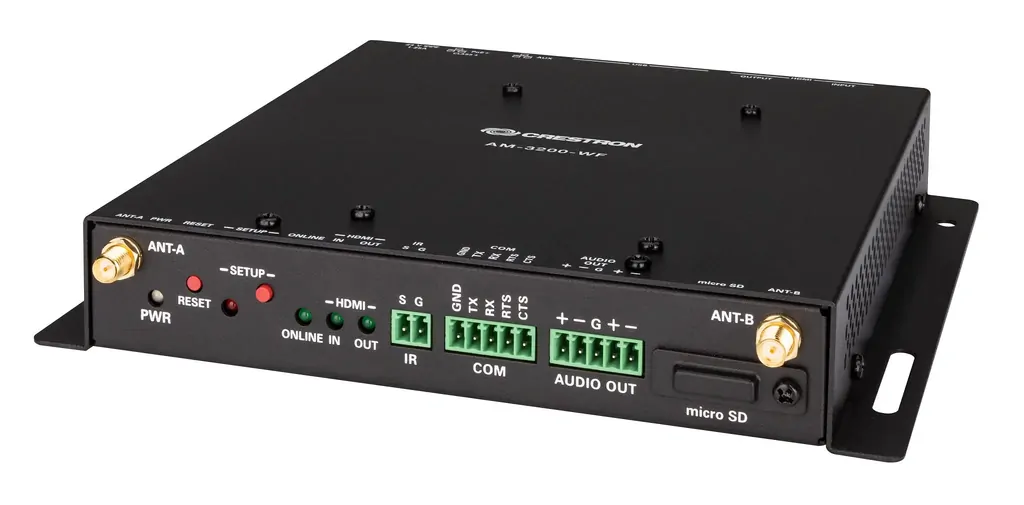
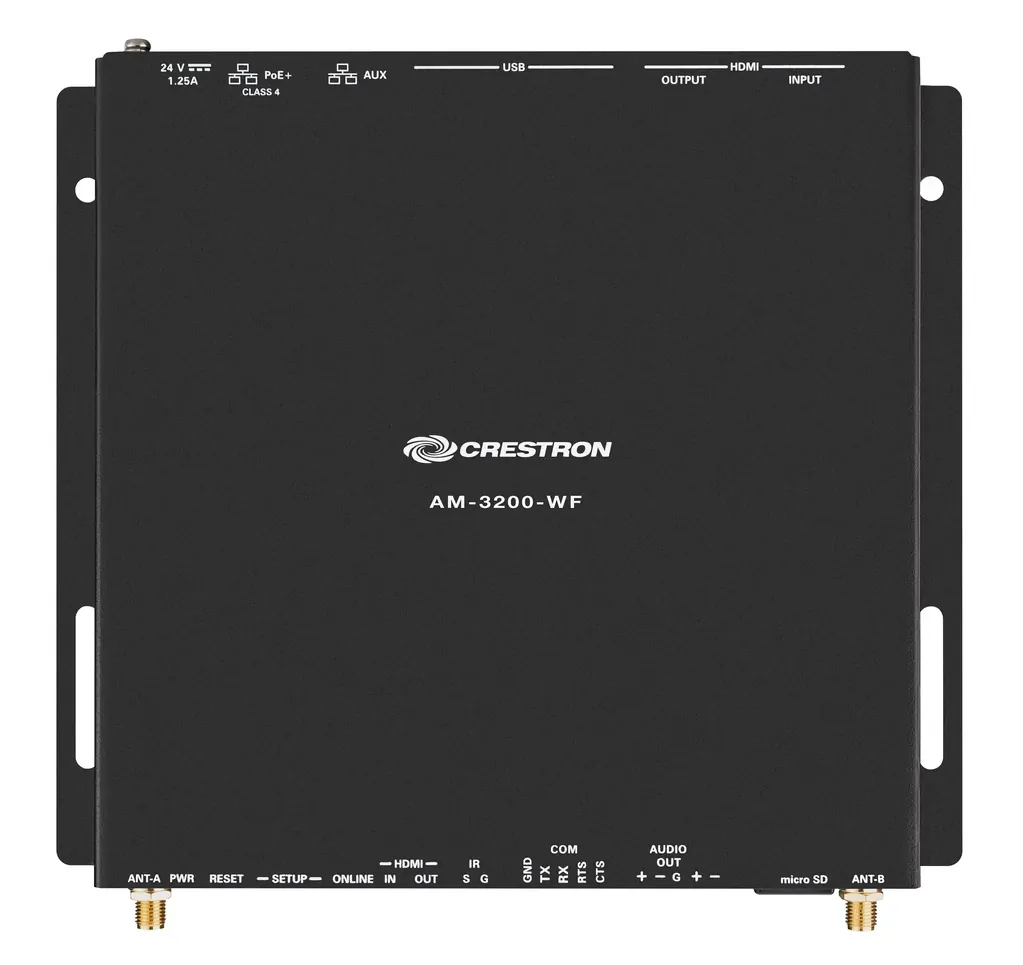
Crestron AM-3200-WF AirMedia Receiver 3200 with Wi-Fi Network Connectivity SKU: AM-3200-WF-R
$319.00
Note: Tested to power on only. Includes Crestron AM-3200-WF Receiver ONLY, Does NOT include Power Supply.


The AirMedia® Receiver 3200 (AM‑3200‑WF) enables secure wireless collaboration in the modern digital workspace. Easy to deploy and manage, install the Receiver in conference rooms, huddle rooms, lounges, lobbies, or almost any space to establish a productive meeting environment.
Key Features
- Complete room solution enables secure presentation from laptops, smartphones, tablet devices, and AirMedia Connect Adapters using either a wired HDMI® connection or a wireless AirMedia® connection
- Integration friendly features such as HDMI® input, dual LAN, balanced audio output, and display control via RS‑232 and IR
- Enables smart automation via intelligent display control, personal device control, occupancy detection, and integration into a broader connected ecosystem
- Enterprise-grade security and content encryption protects privacy and ensures compliance with IT policies
- XiO Cloud® service support for remote provisioning and management
- Built-in digital signage functionality with support for Appspace® software and other web-based signage providers
- Supports simultaneous display of up to four sources with AirMedia Canvas when presenting using the AirMedia Applications, Apple Screen Mirroring or Chrome Extension. Displays up to three sources when presenting using Miracast or Connect Devices (AM‑TX3‑100 or AM‑TX3‑200).
- Wireless conferencing and presentation allows for collaboration with in-room and remote participants
- TAA compliant
(AM-3200-WF-R)
Communications |
|
| Ethernet | 100/1000 Mbps, auto-switching, autonegotiating, autodiscovery, full/half duplex, TCP/IP, UDP/IP, DHCP, SSL, TLS5, SSH, SFTP (SSH File Transfer Protocol), IEEE 802.1x, Active Directory authentication, HTTPS web browser setup and XiO Cloud service, 802.3at compliant |
| Wi-Fi | Dual-band 802.11a/b/g/n/ac/ax (2.4 GHz & 5 GHz); Up to 100 ft (30 m) range at 80 Mbps, subject to site‑specific conditions |
| Bluetooth® Communications | Bluetooth version 5.0 |
| AirMedia | Via Ethernet: IPv4, mDNS, TLS, AES1; Via wireless access point: IEEE 802.11/b/g/n/ac/ax, 2.4 GHz or 5 GHz |
| USB Host | USB 2.0 for connecting a USB conferencing peripheral; USB 3.0 for connecting a USB conferencing peripheral |
| USB Device | USB 3.0 for computer console (installer setup and firmware update) |
| RS-232 | 2-way display device control up to 115.2k baud with hardware and software handshaking |
| IR/Serial | 1-way display device control via infrared up to 1.1 MHz or serial TTL/RS-232 (0-5V) up to 19.2k baud |
| HDMI Input | HDCP 1.4, EDID; Supports management of HDCP and EDID |
| HDMI Output | HDCP 2.2, EDID, CEC; Supports management of HDCP and EDID |
Video |
|
| Input Signal Types | AirMedia, HDMI (DVI & Dual-Mode DisplayPort™ compatible2); Supports simultaneous display of up to four sources with AirMedia Canvas when presenting using the AirMedia Applications, Apple Screen Mirroring or Chrome Extension. Displays up to three sources when presenting using Miracast or Connect Devices (AM‑TX3‑100 or AM‑TX3‑200).3 |
| Maximum Input Resolutions | HDMI Input: 1920x1080@60Hz (HD 1080p60); AirMedia presentation: 1920x1080@30Hz (1080p30); AirMedia Connect Adapter: 3840x2160@30Hz (4K30) NOTES:
|
| Output Signal Types | HDMI (DVI compatible2) |
| HDMI Output Resolutions | 1280x720@50Hz (720p50), 1280x720@60Hz (720p60), 1280x800@60Hz,6 1366x768@60Hz,6 1440x900@60Hz,6 1600x900@60Hz,6 1600x1200@60Hz, 1680x1050@60Hz,6 1920x1080@50Hz (1080p50), 1920x1080@60Hz (1080p60), 3840x2160@30Hz (2160p30), 3840x2160@50Hz (2160p50), 3840x2160@60Hz (2160p60) NOTE: All video inputs will be scaled to the selected HDMI output resolution. |
| Background & Logo File Support | JPEG, PNG |
Audio |
|
| Input Signal Types | AirMedia, HDMI (Dual-Mode DisplayPort™ compatible2) |
| Output Signal Type | HDMI |
| Input/Output Format | 2 channel LPCM |
| NOTE: Audio input signals are passed to the output without any processing. Volume control capability requires a display device with discrete volume, up, down, and mute commands available via CEC, IP, IR, or RS‑232. | |
AirMedia Software1 |
|
| OS Support | Apple® iOS®, Android™, Windows 10, Windows 11, macOS®, Chrome OS™ |
| Video Frame Rate | Up to 30 fps, audio supported |
| Output Resolutions | 640x480@60Hz, 800x600@60Hz, 1024x768@60Hz, 1280x720@50Hz (720p50), 1280x720@60Hz (720p60), 1280x800@60Hz, 1366x768@60Hz, 1440x900@60Hz, 1600x900@60Hz, 1600x1200@60Hz, 1680x1050@60Hz, 1920x1080@50Hz (1080p50), 1920x1080@60Hz (1080p60) NOTE: All video inputs will be scaled to the selected HDMI output resolution. |
| Bitrate Peak | 0.25 to 8.5 Mbps, variable depending on content complexity |
| Bitrate Average | 1.4 Mbps typical NOTES:
|
| Audio Format | Stereo |
Wireless Conferencing |
|
| OS Support (AirMedia Application) | Windows 10, Windows 11 |
| OS Support (AirMedia Connect Adaptor) | Windows 10, Windows 11, macOS 11 or later |
| Supported Conferencing Services |
Microsoft Teams software; |
| Supported Conferencing Peripherals | For a list of supported conferencing peripherals, refer to OLH 1001764. |
Connectors |
|
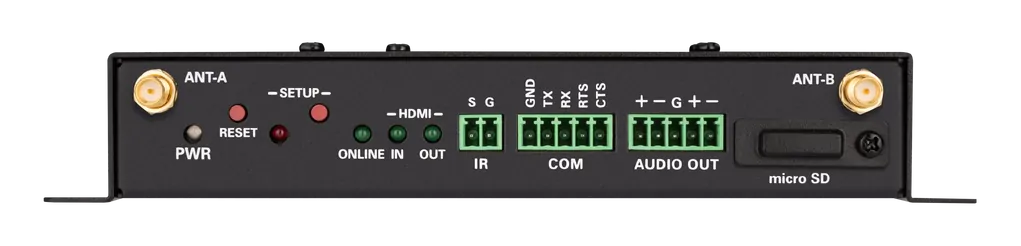
| ANT‑A & ANT‑B | (2) SMA connectors for external Wi‑Fi antennas; Wi‑Fi antennas included with 6.56 ft (2 m) cables |
| IR | (1) 2-pin 3.5 mm detachable terminal block; IR/Serial output port for display device control; IR output up to 1.1 MHz; 1-way serial TTL/RS-232 (0-5V) up to 19200 baud |
| COM | (1) 5-pin 3.5 mm detachable terminal block; Bidirectional RS-232 port for display device control; Up to 115.2k baud, hardware and software handshaking support |
| AUDIO OUT | (1) 5-pin 3.5 mm detachable terminal block; Balanced/unbalanced stereo line-level audio output; Maximum Output Level: 4 Vrms balanced, 2 Vrms unbalanced; Output Impedance: 200 ohms balanced, 100 ohms unbalanced |
| microSD | For caching digital signage content |
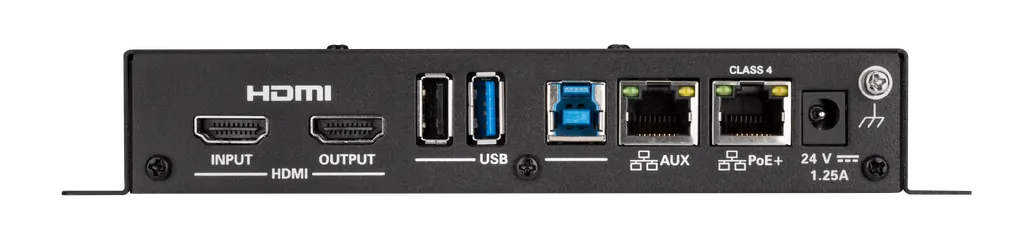
| HDMI INPUT | (1) HDMI Type A connector; HDMI digital video/audio input; (DVI & Dual-Mode DisplayPort compatible2) |
| HDMI OUTPUT | (1) HDMI Type A connector; HDMI digital video/audio output (DVI compatible2) |
| USB | (2) USB Type A connectors; USB 2.0 host port for USB conferencing peripheral; USB 3.0 host port for USB conferencing peripheral; (1) USB Type B connector; USB 3.0 device port for computer console |
| LAN PoE+ | (1) 8-pin RJ-45 connector; 100Base-TX/1000Base-T Ethernet port and PoE+ Class 4 |
| LAN AUX | (1) 8-pin RJ-45 connector; 100Base-TX/1000Base-T Ethernet port; Connects to a secondary, guest‑only network |
| 24VDC 1.25A | (1) 2.1 x 5.5 mm DC power connector; 24VDC power input; PW‑2412WU power pack sold separately |
Controls and Indicators |
|
| PWR | (1) Green LED, indicates operating power supplied via the local power pack or PoE+ |
| RESET | (1) Recessed push button for hardware reset |
| SETUP | (1) Recessed push button for onscreen IP address display and for pairing the device to an AM‑TX3‑100; (1) Red/White LED, indicates pairing status |
| ONLINE | (1) Green LED, indicates control system connection |
| HDMI IN/OUT | (2) Green LEDs, indicate HDMI signal presence at the HDMI input/output |
| microSD | (1) microSD slot |
| LAN PoE+ | (2) LEDs, green LED indicates Ethernet link status, amber LED indicates Ethernet activity |
| LAN AUX | (2) LEDs, green LED indicates Ethernet link status, amber LED indicates Ethernet activity |
Power |
|
| Power over Ethernet | IEEE 802.3at Class 4 Powered Device |
| Power Pack (sold separately) | Input: 100-240VAC, 50/60 Hz; Output: 1.25A @ 24VDC; Model: PW‑2412WU |
| Power Consumption | 14 W (typical) |
| NOTE: When wireless conferencing is used, the receiver must be powered by either Power over Ethernet+ (PoE+) or a power pack (sold separately). | |
Environmental |
|
| Temperature | 32° to 104°F (-0° to 40° C) |
| Humidity | 10% to 90% RH (non‑condensing) |
| Heat Dissipation | 47.8 BTU/hr |
Construction |
|
| Chassis | Metal, black finish, with (2) integral mounting flanges, vented sides |
| Mounting | Freestanding, surface mount, or attach to a single rack rail |
Dimensions |
|
| Height | 1.26 in. (33 mm) |
| Width | 7.40 in. (188 mm) |
| Depth | 6.93 in. (177 mm) |
Weight |
|
| 1.9 lb (0.86 kg) | |
Compliance |
|
| Regulatory Model: M202011001 ETL Listed for the United States and Canada to UL/IEC 62368-1 safety standards. CE compliant for applicable European Union requirements. |
|
- Full-motion video performance is dependent upon the performance of the network and the sending device. Computer client software and mobile device apps are available for download.
- Using an appropriate adapter or interface cable, the HDMI input can support DVI and Dual-Mode DisplayPort sources, and the HDMI output can provide a DVI signal. CBL‑HD‑DVI interface cables are available separately.
- When the AirMedia Canvas feature is enabled, the 4:2:0 color space is used for high definition sources connected to the HDMI input port. When the AirMedia Canvas feature is disabled, the 4:4:4 color space is used. If the 4:4:4 color space is required by sources connected to the HDMI input port, the AirMedia Canvas feature should be disabled.
- Crestron supports most mainstream devices and applications. Refer to the AirMedia Series 3 Product Manual for a complete list.
- TLS 1.3 is currently not supported.
- With or without reduced blanking.
| SKU | AM-3200-WF-R |
| Barcode # | 634607289713 |
| Brand | Crestron |
| Brand | Crestron |
| Type | Wireless Video Receiver |
| Model | AM-3200-WF |
| Shipping Cubic | 0.017794000m3 |
Be The First To Review This Product!
Help other Australian Computer Traders users shop smarter by writing reviews for products you have purchased.



 Help Centre
 Contact Us